
Preparing your phone for sale can be a crucial step in ensuring a smooth and secure transaction. This comprehensive guide will walk you through the essential steps of prepping your phone for sale, covering everything from backing up your data to factory resetting your device. Whether you’re upgrading to a new phone or simply looking to declutter, following these instructions will help you maximize the resale value of your phone and protect your personal information. This step-by-step guide covers all makes and models, ensuring a seamless process whether you have an iPhone or an Android.
Selling your phone? Don’t risk your personal data. This guide offers vital steps for prepping your phone for sale, ensuring a safe and profitable transaction. Learn how to properly back up your data, securely erase your information, and present your phone in the best possible light to potential buyers. By following this step-by-step guide, you can confidently sell your phone knowing your privacy is protected and you’re receiving the best possible return on your investment. From data transfer to factory reset, we cover every essential step in the phone selling process.
Backing Up Your Phone Data
Before selling your phone, it’s crucial to back up your data. This ensures you retain important information like contacts, photos, and applications. There are several methods for backing up your data.
Cloud Backup
Using a cloud service like iCloud (for iPhones) or Google Drive (for Android) offers a convenient way to store your data. Ensure you have sufficient cloud storage and a stable internet connection for the backup process.
Computer Backup
Connect your phone to your computer and use the respective software (iTunes or Finder for iPhones, or your device’s file explorer for Android) to create a full backup. This method is ideal for larger data backups.
Memory Card Backup (If Applicable)
If your phone supports external storage, you can copy important files to a memory card. While useful, this method might not capture all data like app settings and system configurations. It is best used as a supplementary backup method.
Choose the method that best suits your needs and ensure the backup is complete before proceeding with the next steps.
Wiping Your Phone Data Securely
Securely erasing your data is crucial before selling your phone. This prevents sensitive information from falling into the wrong hands. A simple factory reset isn’t always enough. Depending on your phone’s operating system, you may need to take extra steps.
For Android devices, locate the “Factory Reset” option, typically found in the Settings menu under “System” or “General Management”. The precise location may vary depending on your phone’s manufacturer and Android version. Ensure your phone is charged or plugged in before initiating the reset.
On iOS devices, navigate to “Settings,” then “General,” followed by “Transfer or Reset iPhone.” Select “Erase All Content and Settings.” Like Android, ensure your iPhone has sufficient power before starting the process.
After the reset, your phone will return to its factory settings, as if it were brand new. Confirm that all personal data, including apps, photos, and messages, are gone before handing off the device.
Removing Your SIM Card and Memory Card
This step is crucial for protecting your personal information. Removing your SIM card ensures your phone number and associated data are no longer tied to the device. Removing the memory card (if your phone has one) safeguards any photos, videos, or other files stored on it.
Most phones have a small tray or slot that houses the SIM and memory cards. Use the SIM ejection tool (usually a small metal pin) that came with your phone, or a small paperclip, to open the tray. Gently insert the tool into the small hole beside the tray and push until the tray pops out. Carefully remove both the SIM card and the memory card (if present).
Store these cards in a safe place until you need them for your new device.
Signing Out of All Accounts
Signing out of your accounts is a critical step in protecting your personal information. It prevents the new owner from accessing your emails, social media, financial accounts, and other sensitive data.
Start by signing out of your main account associated with the phone. This is typically your Google account on Android devices or your Apple ID on iPhones. This central account often manages access to other apps and services.
Next, individually sign out of all other essential apps. This includes:
- Email accounts (e.g., Gmail, Outlook)
- Social media platforms (e.g., Facebook, Instagram, Twitter)
- Cloud storage services (e.g., Google Drive, iCloud)
- Financial apps (e.g., banking apps, payment platforms)
- App stores (e.g., Google Play Store, Apple App Store)
- Communication apps (e.g., WhatsApp, Telegram)
Don’t just close the apps. Ensure you are completely signed out of each one within the app’s settings.
Disabling Find My Phone/Device
Before selling your phone, it’s crucial to disable any tracking features. This ensures the new owner has full control of the device and you can’t track its location after the sale. This step varies slightly depending on your phone’s operating system.
For iOS (iPhone):
Go to Settings > [Your Name] > Find My > Find My iPhone. Toggle the Find My iPhone switch to the off position. You’ll be prompted to enter your Apple ID password to confirm.
For Android:
Open Settings > Security > Find My Device (or similar, depending on your Android version and manufacturer). Disable the Find My Device feature. You may need to enter your Google account password.
Disabling this feature not only protects your privacy but also prevents the new owner from encountering activation locks or other restrictions tied to your account.
Cleaning Your Phone for Presentation
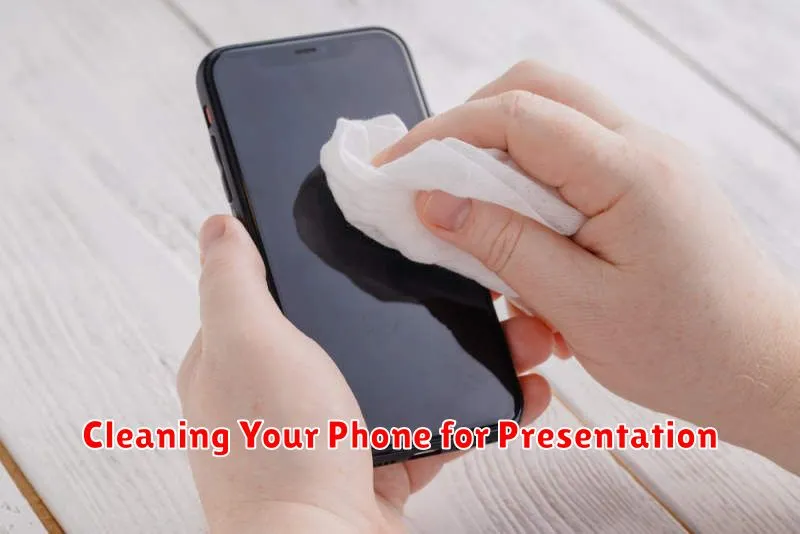
First impressions matter. A clean phone suggests a well-cared-for device, increasing buyer confidence. Begin by powering off your phone completely. This is a crucial safety step.
Use a soft, slightly damp (not wet) microfiber cloth to wipe down the entire phone. Pay particular attention to the screen, removing fingerprints and smudges. For stubborn grime, consider using a screen-cleaning solution specifically designed for electronics. Avoid household cleaners, which can damage the delicate coating.
Use a dry cotton swab or a soft-bristled brush to clean the charging port, speaker grills, and other crevices. Be gentle to avoid causing any damage. A clean phone presents a more appealing product and can contribute to a successful sale.
What to Include When Selling Your Phone
When selling your phone, providing the right accessories can significantly impact the sale. Consider including the original charging cable and power adapter. While not always essential, including these items can add value and make your listing more attractive to potential buyers.
If you have the original box, including it presents a more complete package and can instill buyer confidence. Any additional accessories like cases or screen protectors, even if used, can sweeten the deal. Be sure to clearly state the condition of all included items.
Lastly, providing a concise summary of the phone’s specifications can be helpful. Include details such as storage capacity, RAM, and model number to ensure transparency and avoid potential questions from buyers.
Tips for a Smooth and Secure Phone Sale
Meet in a safe public place. Avoid meeting at your home or the buyer’s home. Opt for a well-lit area with security cameras, such as a coffee shop or a police station lobby.
Accept cash or secure payment methods. Avoid personal checks or money orders, which can be easily counterfeited. Digital payment platforms that offer buyer/seller protection are preferred. If accepting cash, verify the bills are legitimate.
Don’t ship the phone before receiving payment. If selling online, ensure the payment is cleared and verified before shipping the device. Use a reputable shipping service with tracking and insurance.
Be cautious of scams. Be wary of buyers who offer significantly more than the asking price or request unusual payment methods. If a deal seems too good to be true, it probably is.
