
In today’s world, nearly everyone has a high-quality camera readily available at all times – their smartphone. With advancements in mobile technology, capturing stunning, professional-quality photos is no longer limited to bulky DSLRs. This comprehensive guide, “Mastering Mobile Photography: Tips and Tricks for Taking Professional Photos with Your Phone,” will equip you with the knowledge and techniques to elevate your mobile photography game. Whether you’re an aspiring photographer or simply looking to improve your everyday snapshots, this article will explore the essential elements of composition, lighting, editing, and more, allowing you to unlock the full potential of your smartphone camera and transform ordinary moments into professional-looking photographs.
From understanding the fundamentals of exposure and focus to exploring advanced concepts like depth of field and mobile editing apps, “Mastering Mobile Photography” provides practical tips and tricks that are easy to implement. Learn to harness the power of natural light, experiment with different perspectives, and master the art of post-processing to create captivating images that rival those taken with dedicated cameras. This guide will empower you to truly master mobile photography and capture the world around you in its most beautiful and compelling form, using just your phone.
Understanding Your Phone’s Camera Settings
Taking truly professional-looking photos with your phone begins with understanding its camera settings. Don’t just rely on auto mode. Dive into the settings and unlock your phone’s photographic potential.
Resolution: Higher resolution means more detail, crucial for larger prints or cropping. Explore your phone’s resolution options and choose the highest setting practical for your storage space.
Aspect Ratio: This refers to the ratio of the image’s width to its height. Common options include 4:3, 16:9, and 1:1 (square). Experiment to find the best fit for your composition.
File Format: JPEG is standard, offering good compression and smaller file sizes. If your phone supports RAW format, consider using it for maximum image quality and editing flexibility. RAW files retain more image data, allowing greater control during post-processing.
Gridlines: Enabling gridlines on your screen can assist in composing shots using the rule of thirds, a fundamental photography technique for balanced and engaging images.
Composition Techniques for Stunning Photos
Composition is key to creating visually appealing photographs. The rule of thirds is a fundamental guideline. Imagine your screen divided into nine equal parts by two horizontal and two vertical lines. Place your subject at the intersection of these lines, or along one of the lines, to create a balanced and engaging image. This technique adds interest and draws the viewer’s eye to the most important elements.
Leading lines are another powerful compositional tool. Use natural or man-made lines, such as roads, fences, or rivers, to guide the viewer’s gaze through the image, creating a sense of depth and perspective. Experiment with different angles to maximize their impact.
Symmetry and patterns can create striking visuals. Look for symmetrical scenes or repeating patterns in your surroundings, and position yourself to capture them effectively. Disrupting the symmetry with a small element can also add an intriguing touch.
Finally, consider framing. Use elements in the foreground, like arches or foliage, to frame your subject and draw attention to it. This technique can add depth and context to your photographs.
Lighting and Exposure Tips
Light is the foundation of a good photograph. Understanding how to use light effectively is crucial for capturing professional-looking images with your phone.
Natural light is generally preferred. Shoot with the sun behind you for evenly lit subjects. Side lighting can create dramatic shadows and depth, while backlighting can produce silhouettes or lens flares. Experiment to find what works best.
Exposure refers to the brightness of your image. Most phone cameras have built-in exposure compensation. If your photo is too dark, increase the exposure. If it’s too bright, decrease it. You can usually do this by tapping on the screen and dragging a slider up or down.
HDR (High Dynamic Range) mode can be useful in high-contrast scenes. It captures multiple exposures and combines them to create a balanced image with detail in both the shadows and highlights.
Mastering Focus and Depth of Field
Focus is crucial for sharp, impactful photos. Most phone cameras utilize autofocus, but learning to control it manually opens up creative possibilities. Tap the screen on your subject to set the focus point. This ensures your intended subject is sharp, even if it’s not in the center of the frame.
Depth of field refers to the area of the image that appears sharp. A shallow depth of field blurs the background, isolating the subject, while a deep depth of field keeps everything in focus. While phone cameras inherently have a large depth of field due to their small sensors, you can achieve a shallower depth of field by getting closer to your subject. Some phones also offer “Portrait Mode” which simulates a shallow depth of field effect.
Experiment with focusing on objects at different distances. Try focusing on a foreground element with the background blurred, then switch focus to the background, blurring the foreground. This practice helps you understand how focus and depth of field impact your images.
Consider the background when composing your shots. A cluttered background can distract from your subject, even with a shallow depth of field. Look for simple, uncluttered backgrounds to make your subject pop.
Editing Your Photos Like a Pro
Editing is a crucial step in achieving professional-looking mobile photos. A few tweaks can transform a good image into a great one. Choose a reliable photo editing app. There are many free and paid options available, offering a range of features from basic adjustments to advanced tools.
Start by adjusting basic parameters like brightness, contrast, and saturation. Subtle changes can make a big difference. Be careful not to over-edit, as this can lead to an unnatural look.
Cropping and straightening can improve composition and remove distracting elements. Experiment with different aspect ratios to find the most pleasing framing for your image.
Explore more advanced tools like selective editing, which allows you to adjust specific areas of your photo. This can be useful for brightening a subject’s face or darkening a distracting background.
Finally, don’t be afraid to experiment with filters and presets. These can add a unique style to your photos, but use them sparingly. A light touch is often best.
Exploring Different Photography Styles
Mastering different photography styles with your phone opens up a world of creative possibilities. Experimenting with various styles allows you to develop your artistic eye and capture unique perspectives.
Consider exploring these popular styles:
- Landscape Photography: Capture the beauty of natural environments. Focus on composition, lighting, and leading lines.
- Portrait Photography: Emphasize the subject’s personality and features. Pay attention to lighting, background, and posing.
- Macro Photography: Reveal intricate details of small subjects. Get up close and personal with flowers, insects, or textures.
- Street Photography: Document everyday life and candid moments in public spaces. Capture the energy and atmosphere of urban environments.
- Minimalist Photography: Focus on simplicity and negative space. Use clean lines and limited color palettes.
Don’t be afraid to try combining elements of different styles to create your own unique approach.
Recommended Accessories for Mobile Photography
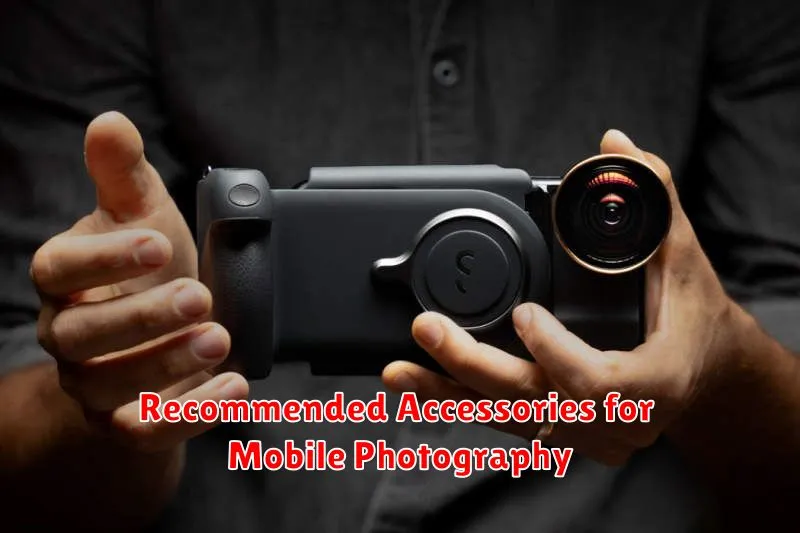
While modern smartphones boast impressive built-in camera technology, certain accessories can significantly elevate your mobile photography game. These tools can help you overcome limitations and unlock creative possibilities.
External Lenses
External lenses offer extended versatility, from wide-angle shots capturing expansive landscapes to macro lenses revealing intricate details. Consider lenses from reputable brands for optimal image quality.
Tripods
Tripods are indispensable for achieving stability, particularly in low-light conditions or when shooting time-lapses. Compact and flexible tripods designed for smartphones are readily available.
Portable Lighting
Portable lighting solutions, such as small LED panels or ring lights, can dramatically improve image quality by providing consistent and controllable illumination. These are especially useful for portrait photography and video recording.
Gimbal Stabilizer
A gimbal stabilizer can transform your mobile videos by eliminating shaky footage and producing smooth, professional-looking results. They are particularly valuable for capturing action shots or moving subjects.
